
Can you run dlt inside Snowflake?
Last week I explored whether dlt could run in a Snowflake UDF... and failed. But can it still run inside Snowflake using a Container? TL/DR: yes, it does 😎


In my last post I explored whether dlt could run in a Snowflake UDF... and failed.
dlt requires access to the local filesystem, so to run it inside Snowflake, I tried again using Snowpark Container Service (SPCS), Snowflake’s managed container orchestration platform... and this time it worked like a charm.
This approach requires a little more setup than simply creating a procedure, but also has a major advantage: Running the smallest instance of a container is (currently) waaay cheaper than running a warehouse - like 6% of the cost of the smallest warehouse, cf. the credit consumption table:
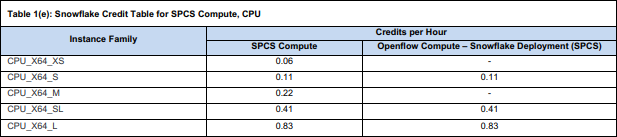
And in the end, I am still able to trigger dlt pipelines using Snowflake tasks without any external infrastructure.
If you want to follow along: I configured the (end to end) dlt pipeline locally, created a container executing the pipeline, pushed that container to SPCS and now execute this container any time I want the pipeline to run.
Prerequisites
To set up a dlt pipeline this way, we’ll need a few components:
Python and dlt installed (obviously 🙄) - I used Python 3.11.9 and dlt 1.20.0
Docker Desktop installed to locally create the container that will later run in Snowflake SPCS
Snowflake CLI installed to push the container from local to Snowflake
And of course a local IDE (like VSCode), ideally with extensions for the 3 other components
With this being set up, let’s first create the end-to-end pipeline using dlt...
Create the dlt pipeline
The data I want to materialize in Snowflake (for analysis and maybe some rETL) in this example is data on Jira issues. dlt provides a framework for those, which is handy in getting started, but required quite some modifications to actually be useful. In the terminal of VSCode and inside the local folder I want to use, the first step is:
dlt init jira snowflakeThis creates most pieces I’ll later need containerized automatically, basically loading template files from dltHub. I’ll quickly go through most of them below, but wanted to briefly mention what I didn’t modify:
./requirements.txtis used for the container later on, but only tells the container to install dlt - that’s it./.dlt/.sourcesis used by dlt, but doesn’t need any modifications
./load_jira.py
The created .py file contains the script to run the pipeline. I renamed and modified it from the template to only contain what I actually need:
from typing import List, Optional

import dlt
from jira import jira

def load(endpoints: Optional[List[str]] = None) -> None:
    """
    Load data from specified Jira endpoints into a dataset.

    Args:
        endpoints: A list of Jira endpoints. If not provided, defaults to all resources.
    """
    if not endpoints:
        endpoints = list(jira().resources.keys())

    pipeline = dlt.pipeline(
        pipeline_name="jira_pipeline",
        destination='snowflake',
        dataset_name="jira",
        # dev_mode=True,           # use a separate timestamped schema
        # refresh="drop_sources"   # drop tables and reset state for full reload
    )

    source = jira().with_resources(*endpoints)

    load_info = pipeline.run(source)

    print(f"Load Information: {load_info}")

if __name__ == "__main__":
    load(endpoints=None)
This file references the class jira in a local subfolder:
./jira/__init__.py
In this file I made a couple modifications. The plain dlt version works fine, but I didn’t just want to push data incrementally to the target, but also load only updated data (mainly: issues) from the source (to speed up the source side), and hence, added get_issues_incremental().
Some Jira endpoints behave differently than others (the “search issues“ endpoint uses a nextPageToken, while the “search projects“ endpoint uses a startAt position-based pagination), hence I also had to adjust the template’s pagination logic. Everything else are standard dlt pipeline configurations (like the merge write-disposition instead of the default append):
""" This source uses Jira API and dlt to load data such as Issues and Projects to the database. """

from typing import Iterable, List, Optional
from datetime import datetime, timezone

import dlt
from dlt.common.typing import DictStrAny, TDataItem
from dlt.sources import DltResource
from dlt.sources.helpers import requests

from .settings import DEFAULT_ENDPOINTS, DEFAULT_PAGE_SIZE

@dlt.source(max_table_nesting=2)
def jira(
    subdomain: str = dlt.secrets.value,
    email: str = dlt.secrets.value,
    api_token: str = dlt.secrets.value,
    page_size: int = DEFAULT_PAGE_SIZE,
) -> Iterable[DltResource]:
    """
    Jira source function that generates a list of resource functions based on endpoints.

    Args:
        subdomain: The subdomain for the Jira instance.
        email: The email to authenticate with.
        api_token: The API token to authenticate with.
        page_size: Maximum number of results per page
    Returns:
        Iterable[DltResource]: List of resource functions.
    """
    resources = []
    for endpoint_name, endpoint_parameters in DEFAULT_ENDPOINTS.items():
        # Special handling for issues endpoint with incremental loading
        if endpoint_name == "issues":
            resource_kwargs = {
                "name": endpoint_name,
                "write_disposition": "merge",
                "primary_key": "id"
            }
            # Add max_table_nesting if present
            if "max_table_nesting" in endpoint_parameters:
                resource_kwargs["max_table_nesting"] = endpoint_parameters["max_table_nesting"]
            # Add columns config if present
            if "columns" in endpoint_parameters:
                resource_kwargs["columns"] = endpoint_parameters["columns"]

            res_function = dlt.resource(
                get_issues_incremental,
                **resource_kwargs
            )(
                subdomain=subdomain,
                email=email,
                api_token=api_token,
                page_size=page_size,
            )
        else:
            resource_kwargs = {
                "name": endpoint_name,
                "write_disposition": "replace"
            }
            # Add max_table_nesting if present
            if "max_table_nesting" in endpoint_parameters:
                resource_kwargs["max_table_nesting"] = endpoint_parameters["max_table_nesting"]

            # Filter out resource-level config from endpoint parameters
            function_params = {k: v for k, v in endpoint_parameters.items()
                             if k not in ["max_table_nesting", "columns", "table_name_hint"]}

            res_function = dlt.resource(
                get_paginated_data,
                **resource_kwargs
            )(
                **function_params,  # type: ignore[arg-type]
                subdomain=subdomain,
                email=email,
                api_token=api_token,
                page_size=page_size,
            )
        resources.append(res_function)

    return resources

def get_issues_incremental(
    subdomain: str,
    email: str,
    api_token: str,
    page_size: int,
    updated_at: dlt.sources.incremental[str] = dlt.sources.incremental(
        "fields.updated", initial_value="1970-01-01"
    ),
) -> Iterable[TDataItem]:
    """
    Fetch JIRA issues incrementally based on the updated timestamp.

    Args:
        subdomain: The subdomain for the Jira instance.
        email: The email to authenticate with.
        api_token: The API token to authenticate with.
        page_size: Maximum number of results per page
        updated_at: Incremental state tracking the last updated timestamp
    Yields:
        Iterable[TDataItem]: Yields pages of issue data from the API.
    """
    # Get the endpoint configuration for issues
    endpoint_config = DEFAULT_ENDPOINTS["issues"]
    api_path = endpoint_config["api_path"]
    base_params = endpoint_config.get("params", {}).copy()

    # Build JQL query with incremental filter
    base_jql = base_params.get("jql", "project is not EMPTY")

    # Convert timestamp to JQL-compatible format (YYYY-MM-DD or YYYY-MM-DD HH:mm)
    # JIRA's updated field returns ISO format like "2024-12-23T08:30:45.123+0000"
    # But JQL accepts simpler formats like "2024-12-23" or "2024-12-23 08:30"
    last_value = updated_at.last_value
    if "T" in last_value:
        # Extract just the date part for JQL: "2024-12-23T08:30:45.123+0000" -> "2024-12-23"
        jql_date = last_value.split("T")[0]
    else:
        jql_date = last_value

    # Add incremental filter to JQL
    incremental_jql = f"{base_jql} AND updated >= '{jql_date}' ORDER BY updated ASC"
    base_params["jql"] = incremental_jql

    # Fetch data using the standard pagination function
    yield from get_paginated_data(
        subdomain=subdomain,
        email=email,
        api_token=api_token,
        page_size=page_size,
        api_path=api_path,
        data_path=endpoint_config.get("data_path"),
        params=base_params,
    )

def get_paginated_data(
    subdomain: str,
    email: str,
    api_token: str,
    page_size: int,
    api_path: str = "rest/api/2/search",
    data_path: Optional[str] = None,
    params: Optional[DictStrAny] = None,
) -> Iterable[TDataItem]:
    """
    Function to fetch paginated data from a Jira API endpoint.

    Args:
        subdomain: The subdomain for the Jira instance.
        email: The email to authenticate with.
        api_token: The API token to authenticate with.
        page_size: Maximum number of results per page
        api_path: The API path for the Jira endpoint.
        data_path: Optional data path to extract from the response.
        params: Optional parameters for the API request.
    Yields:
        Iterable[TDataItem]: Yields pages of data from the API.
    """
    url = f"https://{subdomain}.atlassian.net/{api_path}"
    headers = {"Accept": "application/json"}
    auth = (email, api_token)
    params = {} if params is None else params
    params["maxResults"] = page_size

    # For old-style pagination, initialize startAt
    if "startAt" not in params:
        params["startAt"] = 0

    while True:
        response = requests.get(url, auth=auth, headers=headers, params=params)
        response.raise_for_status()
        result = response.json()

        # Handle both dict and list responses
        if isinstance(result, list):
            # If response is a list, it's not paginated - return all results and stop
            if len(result) > 0:
                yield result
            break

        if data_path:
            results_page = result.pop(data_path)
        else:
            results_page = result

        if len(results_page) == 0:
            break

        yield results_page

        # Check for next page - prefer nextPageToken if available
        if "nextPageToken" in result or "isLast" in result:
            # New API: check for isLast flag
            if result.get("isLast", False):
                # isLast=True means no more pages
                break
            # Get the next page token
            next_page_token = result.get("nextPageToken")
            if not next_page_token:
                break
            # Update params with the next page token
            params["nextPageToken"] = next_page_token
        else:
            # Old API: continue from next page using startAt
            params["startAt"] += len(results_page)
The other .py file in this subfolder contains the configuration of the endpoints from which data should be extracted and is referenced by the init.
./jira/settings.py
The settings of a dlt source define what data to actually extract from the source:
DEFAULT_ENDPOINTS = {
    "issues": {
        "data_path": "issues",
        "api_path": "rest/api/3/search/jql",
        "params": {
            "jql": "project is not EMPTY",
            "fields": "*all",
            "expand": "changelog",
        },
        "columns": {
            # Prevent unnesting of these custom fields - keep as JSON
            "fields__customfield_10003": {"data_type": "json"},
            "fields__customfield_10020": {"data_type": "json"},
            "fields__customfield_10021": {"data_type": "json"},
            "fields__customfield_10108": {"data_type": "json"},
            "fields__customfield_10109": {"data_type": "json"},
            "fields__customfield_10118": {"data_type": "json"},
            "fields__customfield_10169": {"data_type": "json"}
        },
        "max_table_nesting": 3  # Unnest comments, changelog, etc.
    },
    "projects": {
        "data_path": "values",
        "api_path": "rest/api/3/project/search",
        "params": {
            "expand": "description,lead,issueTypes,url,projectKeys,permissions,insight"
        },
        "max_table_nesting": 0  # Don't create any child tables for projects
    },
}
DEFAULT_PAGE_SIZE = 50
I only need data in issues and projects, so those are my two endpoints. I am potentially interested in the changelog of issue field values, so I expand on this, and I am not interested in unnesting any custom fields, so I exclude them from the automatic unnesting.
Wouldn’t it be easier to define what fields to unnest instead of defining which not to unnest? Absolutely! If you know or find out how to do this, please let me know 😜
./.dlt/config.toml
The config.toml could remain untouched if it wasn’t for one detail: dlt sends anonymous telemetry data to dltHub, which would be perfectly fine with me. But as we’ll see later, I use external access integrations in Snowflake and didn’t really feel like investigating which hosts I would have to whitelist for the telemetry to work. So I disabled the telemetry:
[runtime]
log_level="INFO"
dlthub_telemetry = false
If by any chance someone from dltHub stumbles upon this and would like to let me know the telemetry endpoints, I’m happy to adjust this paragraph and my external access integration 😉
./.dlt/secrets.toml
This is where all the secrets to access both Jira and Snowflake are stored. The major change from the dlt template in here is: I use a key pair for the service user in Snowflake, not a password.
[sources.jira]
subdomain = "<just the subdomain without .atlassian.net>"
email = "<user>"
api_token = "<API token>"

[destination.snowflake.credentials]
database = "RAW"
username = "DLT"
private_key = """-----BEGIN ENCRYPTED PRIVATE KEY-----
MI...Fj
-----END ENCRYPTED PRIVATE KEY-----"""
private_key_passphrase="<passphrase>"
host = "<account identifier - the stuff before .snowflakecomputing.com>"
warehouse = "<warehouse>"
role = "<role>"
Wait, is it ok to store the key as a string in the code? You should definitely ensure not checking in the secrets.toml into your git repo, but since it will be a file in a container, i.m.h.o. it’s fine. I don’t really see a difference from using an environment variable in the container config instead. There is presumably a better way to do this with using a secret in Snowflake and the SPCS container retrieving it from there, but that’s a topic for another day...
Create and push the container
When the dlt pipeline runs locally (you definitely want finish engineering it before pushing it to SPCS!), it contains everything it needs to run virtually anywhere a containerized version of it would run to. So let’s containerize it!
To learn how to do this with Snowflake I found this intro (particularly the second half on the “Temperature Conversion REST API”) useful:
snowflake.com/en/developers/guides/intro-to-snowpark-container-services
Also, the smart people over at SELECT have an informative post on SPCS and how it works generally:
select.dev/posts/snowpark-container-services
Create container components locally
To get the container into SPCS I need 2 more files: First, the dockerfile will tell docker how the container should look like and what it should do:
FROM python:3.11

# Set Python to run in unbuffered mode so logs appear immediately
ENV PYTHONUNBUFFERED=1

# Copy the packages file into the build
WORKDIR /app
COPY ./ /app/

# Run the install using the packages manifest file
RUN pip install --no-cache-dir -r requirements.txt

# When the container launches run the pipeline script
CMD ["python", "-u", "load_jira.py"]
So all my container will do is install the requirements from requirements.txt and execute the load_jira.py.
Second, Snowflake needs to know where to find the container, so I add a load-jira.yaml to my container registry. If you don’t have a registry, yet, I’ll get to this in a bit:
spec:
  containers:
    - name: load-jira
      image: <account identifier>.registry.snowflakecomputing.com/<catalog>/<schema>/<image_repo>/load_jira:latest
Create the Docker image
Now we’re back to the VSCode terminal, with Docker Desktop up and running in the background. First, I create an image from my app (according to the dockerfile with mse being a replaceable shorthand for my name):
docker build --platform=linux/amd64 -t mse/load_jira:latest .Next, I tag the image so it matches the .yaml config (cf. above):
docker tag mse/load_jira:latest <account identifier>.registry.snowflakecomputing.com/<catalog>/<schema>/<image_repo>/load_jira:latestBut before I could push the image to Snowflake, I now have to configure a few things over there...
Set up Snowflake
I need a few things for SPCS containers to work (cf. both the Snowflake intro and the SELECT post mentioned earlier)
First, I need an image repository to hold the Docker image:
use role accountadmin;

create image repository meta.load.image_repo;

show image repositories in schema meta.load;

grant read, write on image repository meta.load.image_repo to role sysadmin;
The repo’s location was already used twice: in the .yaml specification and Docker tag - this is where the <catalog>/<schema>/<image_repo> path comes from
Second, I need an (internal) stage holding my service specification .yaml (what I called “container registry” earlier) - this is technically optional, but I find it more intuitive to create this .yaml once and reference it in the service definition later, than containing the specification in the service definition itself. But I guess that’s a matter of personal preference.
use role sysadmin;

create stage if not exists meta.load.s_specs
directory = (
    enable = true
    auto_refresh = true
)
;
Third, I need a compute pool to execute the container on:
use role accountadmin;

create compute pool if not exists cp_elt
min_nodes = 1
max_nodes = 1
instance_family = cpu_x64_xs
auto_resume = true
auto_suspend_secs = 60
;

grant usage, monitor, operate on compute pool cp_elt to role sysadmin;
And finally, though this is optional and depending on individual Snowflake setups, I need an external access integration for my pipeline to access both the Jira endpoint and my own Snowflake instance. It’s kind of weird to explicitly have to allow access to Snowflake from a container running in Snowflake, but since dlt doesn’t use Snowflake’s internal protocols, but rather public endpoints, this is a necessary step.
The Jira endpoint is fairly easy:
use role sysadmin;

create or replace network rule meta.integration.nr_jira_egress
mode = 'EGRESS'
type = 'HOST_PORT'
value_list = ('<my subdomain again>.atlassian.net:443')
comment = 'Network Rule to access atlassian.net'
;
The Snowflake endpoints can be identified using SYSTEM$ALLOWLIST():
use role sysadmin;

select listagg(
    concat(
        '''',
        value:host::string,
        ':',
        value:port::number,
        ''''
    ),
    ', '
)
from table(
    flatten(
        input => parse_json(system$allowlist())
    )
)
;

create or replace network rule meta.integration.nr_snowflake
mode = 'EGRESS'
type = 'HOST_PORT'
value_list = (<output of the previous query here>)
comment = 'Network Rule to access Snowflake via https'
;
And with both egress network rules in place, the EAI:
use role accountadmin;

create or replace external access integration i_jira_dlt
allowed_network_rules = (meta.integration.nr_jira_egress, meta.integration.nr_snowflake)
enabled = true
comment = 'Integration to access atlassian.net + Snowflake'
;

grant usage on integration i_jira_dlt to role sysadmin;
Push the button
The next step is to upload the load-jira.yaml to the specification stage created above. I simply do this using Snowsight, but using the CLI works just as well:

To then push the docker image into the image repository, I sign in to Snowflake using the VSCode terminal and Snowflake CLI, using a role that is permitted to write on the repo:
snow spcs image-registry login --connection sysadminAnd finally push the Docker image to the repo:
docker push <account identifier>.registry.snowflakecomputing.com/<catalog>/<schema>/<image_repo>/load_jira:latestRun the container in Snowflake
Now it finally is time to run the dlt pipeline in Snowflake. There are essentially two ways to run a container in SPCS either as a defined service or a job service.
A service is meant to run 24/7 unless explicitly suspended, while a job service is supposed to run and automatically terminate when finished. Sounds a lot like we should use a job service for the pipeline. However, there is a caveat:
A job service is created and triggered explicitly every time it should run. And while creating a job service, the Snowflake documentation mentions external access integrations (which I chose to use in my Snowflake instance) are allowed, when I try to do this, I run into a syntax error:
drop service if exists raw.jira.load_jira;

execute job service
in compute pool cp_elt
name = raw.jira.load_jira
async = true
from @meta.load.s_specs
specification_file = 'load-jira.yaml'
external_access_integrations = (i_jira_dlt) -- only need atlassian + snowflake
;
I contacted the Snowflake Support about this and will update the original post here as soon as I have a solution.
Meanwhile, using a standard service with EAI works. The auto-suspense parameter is currently in public preview and doesn’t do anything here, hence I explicitly suspend the service after it finished using a task:
drop service if exists raw.jira.load_jira;

create service raw.jira.load_jira
in compute pool cp_elt
from @meta.load.s_specs
specification_file = 'load-jira.yaml'
external_access_integrations = (i_jira_dlt) -- only need atlassian + snowflake
auto_suspend_secs = 300 -- currently doesn't work (is in PP)
auto_resume = true
;

create or replace task raw.jira.ta_load_jira
user_task_managed_initial_warehouse_size = 'XSMALL'
serverless_task_max_statement_size = 'XSMALL'
schedule = 'USING CRON 40 8 * * MON-FRI Europe/Zurich'
allow_overlapping_execution = false
-- target_completion_interval = '30 MINUTES'
user_task_timeout_ms = 1800000 -- 30 minutes
task_auto_retry_attempts = 0
comment = 'Refresh Jira data via dlt'
as
declare
    max_attempts integer default 60; -- 60 * 30 seconds = 30 minutes max
    attempt integer default 0;
    status_result varchar;
begin
    -- resume the service to start the job
    alter service raw.jira.load_jira resume;

    -- poll for completion (check every 30 seconds)
    while (attempt < max_attempts) do
        -- wait 30 seconds
        call system$wait(30);

        -- get service status
        call system$get_service_status('RAW.JIRA.LOAD_JIRA') into :status_result;

        -- check if container is done
        if (status_result like '%"status":"DONE"%' or
            status_result like '%"containerStatus":"terminated"%') then
            -- job completed, suspend the service
            alter service raw.jira.load_jira suspend;
            return 'Job completed successfully';
        end if;

        attempt := attempt + 1;
    end while;

    -- timeout - suspend anyway
    alter service raw.jira.load_jira suspend; -- compute pool will suspend 1 minute later if idle
end;

alter task raw.jira.task_load_jira resume;
Now, with this approach I have a working solution, but particularly the credit-consumption benefit of SPCS is nullified as the task (running on a warehouse) runs alongside the SPCS container service. But I’m sure job services will eventually be compatible with EAIs and then triggering one asynchronously (without the warehouse waiting for it to finish) can suddenly be a huge cost saver 🤑